

26 September 2026
A cheap LED strip and a protocol nobody documented
The LED controller in my car accepted every Bluetooth frame I sent and did nothing with any of them. This is how I worked out what it expects, and how that grew into WireAmbi, an app with a music mode that gets from a detected beat to a Bluetooth write in 6 ms on average.
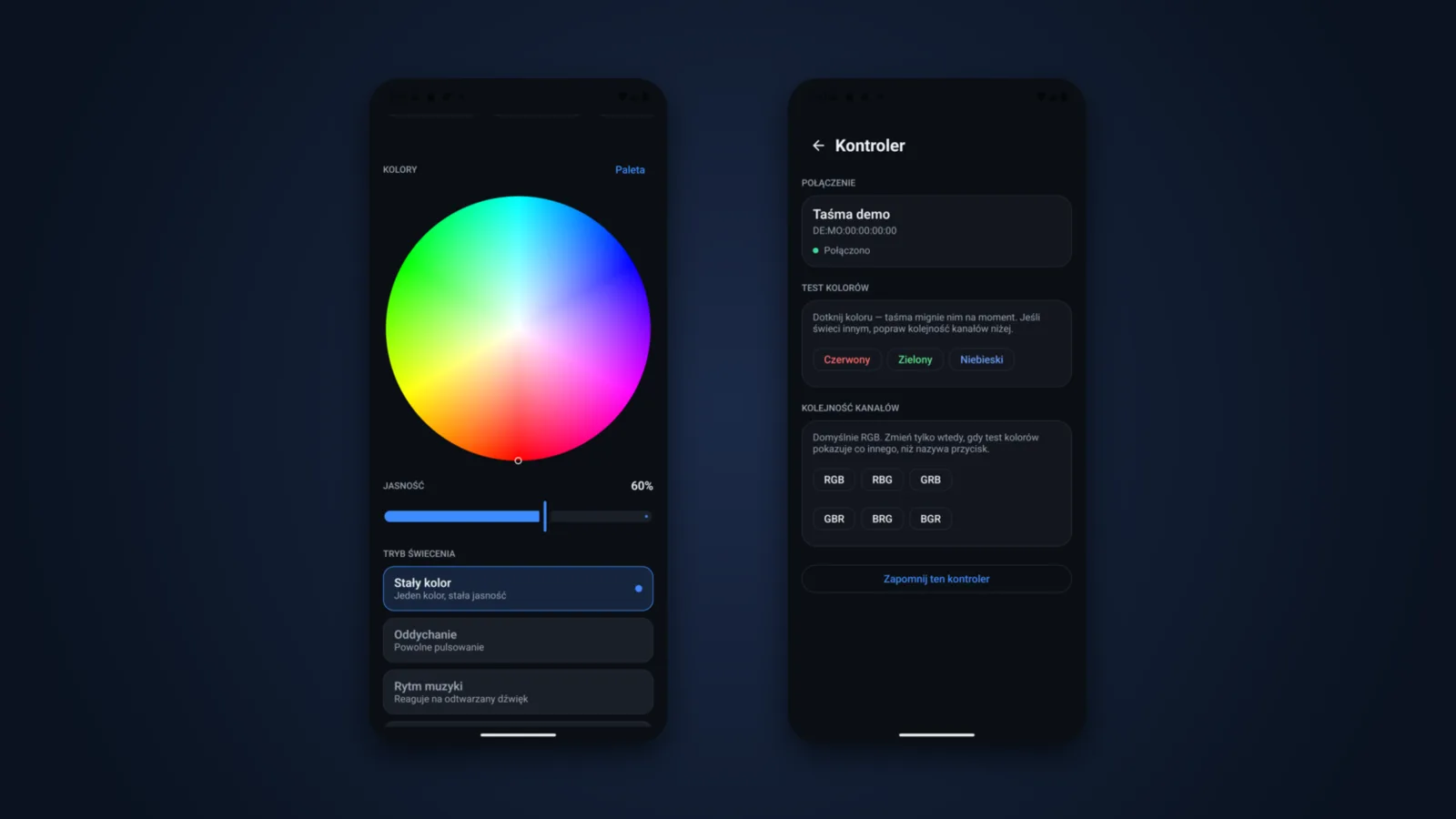
The LED strip in my car is driven by a MELK-OC21, a controller from the ELK-BLEDOM family. These controllers are cheap and common, but they come with no documentation whatsoever, and the manufacturer's app doesn't run on the Android Auto screen. I wanted to change the lighting from the car's screen, so I wrote my own app, WireAmbi. Most of the time went not into the interface but into the controller itself, which for a long while accepted everything and did nothing.
First connection
Once connected, the controller shows a single GATT service, FFF0. Commands are written to the FFF3 characteristic without a response, and FFF4 is supposed to send notifications. Mine never sent a thing through it, not even after a status-query frame. So the app has to remember what it has set.
Two more things caught me out early on. The controller doesn't advertise the FFF0 service in its advertising packet, so a scan filtered by UUID found nothing and I had to filter by name. It also accepts only one connection at a time: while another app or the gateway in the car holds it, the phone can't get in.
A frame the strip ignored
Every command is 9 bytes: a 7E header, an EF footer and seven bytes in between. The first version of WireAmbi sent colour as 7E 07 05 03 R G B 10 EF. Every Bluetooth write reported success, and the strip didn't change colour. It looked like a link problem or a bug in the app, but the frame itself was to blame: no model on the public list of variants uses that colour format.
That list is the model table from the elkbledom integration for Home Assistant, the most widely tested public list of these controllers. It shows that controllers sold as ELK-BLEDOM, MELK or LEDBLE share the frame skeleton but differ in the byte after the header, in the padding, and sometimes in the command values themselves. I took the patterns from that table and checked the MELK variant against my own controller:
| Command | ELK-BLEDOM | MELK (mine) | MELK-Ox |
|---|---|---|---|
| Power on | 7E 00 04 F0 00 01 FF 00 EF |
7E 00 04 01 00 00 00 00 EF |
7E 04 04 F0 00 01 FF 00 EF |
| Colour | 7E 00 05 03 RR GG BB 00 EF |
same | same |
| Brightness | 7E 00 01 i FF 00 FF 00 EF |
7E 04 01 i FF 00 FF 00 EF |
7E 04 01 i 01 FF FF 00 EF |
That's where WireAmbi's protocol layer came from. It has three variants and picks one by device name, using the longest matching prefix. MELK-OC21 doesn't match MELK-OC10, so it falls through to the generic MELK variant. There was one more trap waiting for me here. After connecting, BluetoothDevice.getName() can return null for a device the system hasn't paired, so the name has to come from the scan result or the saved device. For a while my dialect came out right only because MELK happens to be the default.
Breathing, computed on the phone
Colour turned out to be the only command every variant agrees on. Each family numbers its built-in effects its own way: 48 means 'breathing' on MELK-Ox and nothing at all on plain MELK. That was exactly the number my controller was getting, which is why breathing mode never worked.
So I dropped the built-in effects and the phone computes breathing itself. The app sends 20 colour frames a second, with brightness following a sine curve and never dropping below 12%. The slider sets the period from 6 down to 1.2 seconds. On the MELK-OC21 I measured 49–51 ms between frames, 19.8 frames a second and not a single rejected write.
For a stream like that to work, the app has to pace its writes. The Bluetooth stack takes one write at a time, and a write issued while its buffer is full is refused as 'busy' and the frame is silently lost. WireAmbi therefore waits for the stack's acknowledgement before sending the next frame, and after a busy refusal it retries 15 ms later, up to four tries. Live colours go into a single-slot buffer that only ever holds the newest one. Before that there was an unbounded queue, and the longer the music played, the older the colours on the strip became. After the fix I counted writes around a pause in the track: 167 before it and none after it, so nothing was left waiting in the queue.
Channel order
Cheap strips are sometimes wired in an order other than RGB, and then 'red' lights up green. The controller has a separate command for this, 7E 06 81 P1 P2 P3 FF 00 EF, and WireAmbi knows all six permutations. I built it into calibration: the colour test makes a swapped order obvious straight away, and a single tap sets the right one, GRB for example, with no resoldering.
Music mode
The protocol has no command that switches on any sound reaction in the controller or sets a sensitivity. So the phone has to listen to the music and keep sending colours as it goes.
The first version listened through the phone's microphone. With Android Auto, though, the audio goes to the car's head unit (or, when testing, to the Desktop Head Unit) rather than to the phone's speaker, so the mic only picked up an echo. The bass level sat at 0.00–0.03 and the detected tempo jumped anywhere from 87 to 182 BPM. The fix was AudioPlaybackCapture, which taps the audio being played before the system routes it anywhere. After the change the bass level rose to 0.08–0.51 and the tempo settled at 116 BPM. As a bonus, the Android Auto delay started working in my favour: the analysis gets the sound before the car's speakers play it.
The analysis chain is an FFT over 1024-sample windows at 22,050 Hz, a logarithmic filter bank with 24 bands per octave, a SuperFlux onset detector and autocorrelation-based tempo tracking. The tempo is used to predict beats, so a flash also goes out when the tempo grid says 'now', even if the detector hasn't seen anything yet. Prediction brought a bug of its own, though: the same beat could fire twice, once predicted and once detected a few dozen milliseconds later, and on the strip that looked like double tempo. Now every flash is followed by a guard period of 0.55 of a beat, and only the first flash gets through.
I measured the delay from the logs. From a detected beat to the Bluetooth write takes 6 ms on average (3 to 13 ms across nine measurements), so sending isn't where the delay comes from. The rest is the analysis: the FFT window covers about 46 ms of audio, which means roughly 23 ms of lag on average, and SuperFlux adds two frames, about 20 ms. Beat prediction wins some of that back. On a 123 BPM track, where the beat period is 488 ms, the median gap between flashes came out at 487 ms, and over 20 seconds the strip flashed 40 times against 41 expected.
The same analysis drives nine reaction styles, from pulse to sparks. A style only decides how the analysis results turn into a colour, so adding a new one doesn't touch the audio chain.
The Android Auto screen
Android Auto allows five templates per task. Each change of template type uses one up, and once they're gone the host closes the app. My first screens switched between a grid and a message depending on the Bluetooth state, so a flaky connection burned through the limit in seconds. Now every screen has a single template type, and errors and empty states appear inside it as an ordinary tile. The other surprise: the car screen's context doesn't inherit the app's language, so I localise the car strings separately. I test all of this in the Desktop Head Unit.
Where it stands
On the Android Auto screen I now have a colour grid, saved scenes and shortcut tiles that I arrange on the phone. Voice commands are recognised by Vosk, with no internet connection. Music mode listens to whatever is playing, so it works even when the sound goes to the car's speakers.
In the car, though, the strip isn't held by the phone but by the led-auto gateway on a Raspberry Pi, because the controller only takes one connection. The phone talks to the gateway over the encrypted WireLink channel. The gateway is then the only device writing to the controller, and it reports the state itself, which also solves the problem of a strip that tells you nothing. The link to the strip itself can't be encrypted, and the project documentation says so plainly.
Once the phone is paired with the gateway, the Android Auto screen stops being just a strip remote and becomes a car panel with Car, Light and Log tabs. On the phone, the car panel shows the state of the locks, doors, windows and battery, alongside a model of the Golf.
Videos and the full write-up: WireAmbi in the portfolio.